

 Status
History
Planning
Disk Chores
Printer
Other Status
History
Planning
Disk Chores
Printer
Other
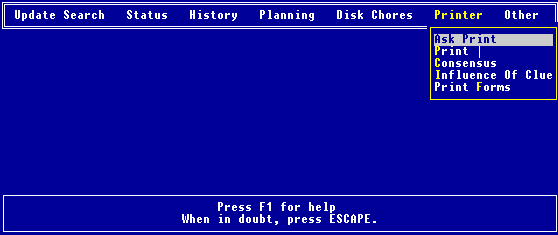 This is where all the printer functions are located. While there are some checks built into this program, we expect you to be somewhat intelligent. If you turn off the printer while printing, or run out of paper, then all bets are off. You have been warned! When this option is enabled you will be asked, at the appropriate time, whether you want certain results printed. When disabled, which is the initial state, you are not asked whether you want to print, and are not able to print. The top right hand side of the screen shows the current choice, viz., either to be asked whether you want to print, "Ask Print: Yes", or, never ask and never print, "Ask Print: No". By looking at the top right hand side of the screen you can see which option you have selected, viz. either print |, "Print |: Yes", (the initial state), or replace them, "Print |: No". Most modern printers can print the IBM graphic characters, if an appropriate dip switch is set inside the printer. For more details on how to do this, consult your printer manual. To understand the idea behind the O'Connor consensus method, go to the Create Consensus option under the Planning menu. You should have created this file previously in your favorite word processor. Some initial experiments may be required to produce a polished final product. A few sample forms are included, which, after you have copied them, could be used as templates with your word processor. We would like to acknowledge NASAR for giving us permission to use their forms for this purpose. Before printing, you will be asked to set the left margin, (default 6 spaces), and to select the number of printed lines per page, (default 57 lines per page). Your file should not contain page breaks or similar characters.
|