 CASIE Help: Other


Update Search
 Status
History
Planning
Disk Chores
Printer
Other Status
History
Planning
Disk Chores
Printer
Other
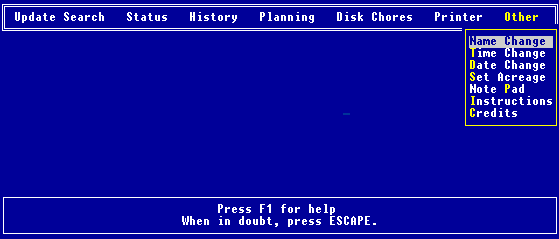
This is where all the remaining chores are performed.
This allows you to change the name of the search.
This allows you to reset the time.
This allows you to reset the date.
This is where you can select the units and initialize the acreages of
the search segments. These acreages are used when computing the POA per
size of area, sometimes called the PDEN, "probability density".
If, when the Mattson consensus was first created, you selected not to
enter the acreages, then each search segment was given the default size of
one unit. This is where you can change that size, and identify the units.
This is a small note pad that handles files (with extension .NTP)
about 10,000 characters long.
Initially you are asked for a filename. If you want to start a new
note pad file, enter a new filename. Otherwise select from the old files
(using the INSERT key). If you then make any changes to the original
document, you will be asked whether you want to save them. If you answer
"yes" the old document is automatically overwritten. If you answer "no",
the new document is discarded.
When you want to exit the note pad, press ESC.
Apart from the usual keys, the following are active:
Ctrl Pg Dn - go to end
Ctrl Pg Up - go to start
F5 - toggle between marking text for delete and insert
F7 - cancels all changes that have been made
F9 - toggles between insert and overtype mode
There is no provision for printing note
pad files from within CASIE III. No, I don't plan to change this!
These are the instructions you should have read at the start!
The wonderful people who helped, and who
accept NO responsibility if anything goes wrong!
|